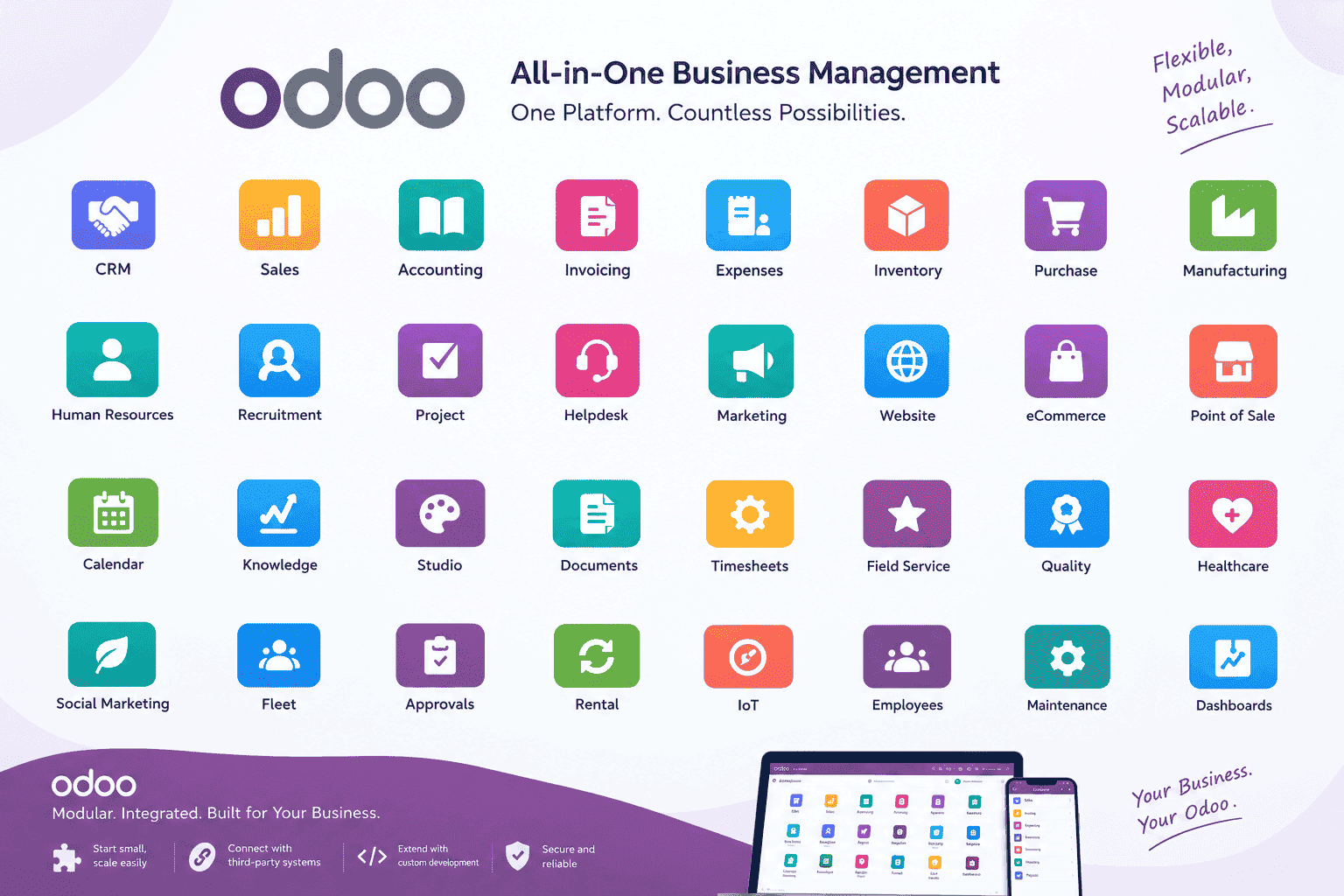
In today's digital business environment, organizations need more than individual software applications for accounting, human resources, inventory, sales, projects, and customer management. They need a connected platform that allows different departments to work with the same information and business processes. Odoo is one of the leading business management platforms designed to address this need through an integrated and modular approach.
What Is Odoo?
Odoo is a comprehensive suite of business applications that can be used to manage many areas of an organization from a single platform. Instead of requiring a separate application for every department, Odoo provides a broad ecosystem of integrated applications covering areas such as Customer Relationship Management (CRM), Sales, Accounting, Expenses, Inventory, Purchasing, Manufacturing, Human Resources, Projects, Website, eCommerce, Point of Sale, Helpdesk, Marketing, and more.
One of Odoo's major strengths is its modular design. An organization does not necessarily need to implement every application at once. It can begin with the applications that address its most immediate requirements and expand the system as its business grows.
This makes Odoo suitable for organizations that want to gradually move from disconnected spreadsheets, standalone applications, and manual processes toward an integrated business management environment.
Odoo itself describes its platform as a suite of integrated business applications covering areas such as CRM, eCommerce, accounting, inventory, point of sale, project management, and other business functions.
Why Is Odoo Considered More Than a Traditional ERP?
Odoo is commonly described as an ERP platform, but its capabilities extend beyond traditional enterprise resource planning. An ERP normally focuses on integrating core business operations such as finance, purchasing, inventory, manufacturing, and human resources.
Odoo combines these capabilities with applications for customer management, sales, websites, eCommerce, marketing, service management, project management, communication, and other business activities.
The result is a platform where information can move between different departments without requiring every department to maintain its own isolated database.
Odoo's Modular Architecture
Odoo is built around modules, also commonly referred to as addons. A module represents a specific business capability and can introduce new functionality or extend existing Odoo functionality.
This modular architecture is particularly important for organizations with specialized business requirements. Instead of replacing the entire platform when a requirement is not available out of the box, developers can create a custom module or extend an existing module.
Examples of Odoo Applications
- CRM: Manage leads, opportunities, customers, and sales pipelines. Learn More (opens in a new tab)
- Sales: Manage quotations, sales orders, customers, products, and invoicing workflows.
- Accounting: Manage financial accounting, invoices, payments, and reporting.
- Expenses: Manage employee expenses, receipts, approvals, and reimbursements. Learn More (opens in a new tab)
- Inventory: Manage warehouses, stock movements, products, and logistics. Learn More (opens in a new tab)
- Purchase: Manage suppliers, purchase orders, requests, and procurement workflows.
- Manufacturing: Manage manufacturing orders, bills of materials, and production operations. Learn More (opens in a new tab)
- Employees: Centralize employee information and HR-related processes. Learn More (opens in a new tab)
- Recruitment: Manage job positions, applications, and recruitment pipelines.
- Project: Organize projects, tasks, deadlines, and team activities.
- Helpdesk: Manage customer support tickets and service operations.
- Website: Build and manage websites within the Odoo ecosystem.
- eCommerce: Manage online products, orders, customers, and online sales.
- Point of Sale: Support retail and restaurant sales operations. Learn More (opens in a new tab)
- Marketing: Support email marketing, automation, events, surveys, and related activities.
Odoo's official application catalog covers business areas ranging from finance and inventory to human resources, marketing, services, productivity, website management, and customization.
Odoo Community vs. Odoo Enterprise: Free vs. Paid
Odoo is available in two principal editions: Odoo Community (free) and Odoo Enterprise (paid). The primary distinction between them is the licensing and subscription model, which in turn determines the available features, support, and services.
Odoo Community (Free)
Odoo Community is the free, open-source edition of Odoo. It provides the core platform and a broad range of business functionality at no licensing cost. It can be installed, hosted, and customized by organizations and development teams without paying for the software itself.
Community is particularly attractive for organizations that want greater control over their deployment environment, want to avoid subscription fees, and want to develop custom modules around an open-source foundation.
Odoo Enterprise (Paid)
Odoo Enterprise is the paid, subscription-based edition. It builds on the Community edition and provides additional functionality and services that are not available in the free version. Depending on the selected deployment and subscription arrangement, Enterprise can provide access to additional applications, professional support, upgrades, and hosting-related services.
The important point for organizations is that the choice between the free Community edition and the paid Enterprise edition should be based on actual business requirements, required applications, support expectations, budget, and deployment strategy.
Why Choose Odoo for Custom Business Solutions?
Standard software applications are often designed around general business processes. However, many organizations have workflows that are unique to their industry or internal operations.
This is where Odoo's extensibility becomes especially valuable.
1. Custom Modules
Developers can create new Odoo modules for business requirements that are not available in the standard applications.
A custom module can introduce new models, screens, reports, workflows, security rules, automated actions, dashboards, integrations, and other functionality.
2. Extending Existing Applications
Customization does not always require building an application from zero. Existing Odoo models and workflows can be extended to accommodate organization-specific requirements.
3. Business Process Automation
Odoo can be configured and customized to automate repetitive processes such as approvals, notifications, document generation, record creation, status transitions, and financial or inventory operations.
4. Centralized Information
When related departments use connected Odoo applications, information can be shared across business processes rather than repeatedly entered into separate systems.
5. Scalability
Organizations can start with a limited number of applications and introduce additional functionality as their requirements evolve.
Examples of Odoo Solutions
Odoo's development framework makes it possible to build solutions for industries and business processes that are not fully covered by standard applications.
Hospital Management
Manage patients, appointments, pharmacy, laboratory, billing, and medical records.
Learn More
Educational Institute
Student admissions, attendance, examinations, fees, and academic management.
Learn More
HR Management
Manage employees, attendance, payroll, recruitment, appraisals, and complete workforce lifecycle.
Learn More
Timesheets Management
Track employee hours against projects and tasks, organize daily and weekly time entries, and analyze logged work time.
Learn More
Inventory Management
Multi-warehouse management, stock tracking, receiving, shipping, and inventory valuation.
Learn More
CRM Management
Manage leads, opportunities, customers, sales activities, follow-ups, and your complete sales pipeline.
Learn More
Invoicing
Create, send, and manage customer invoices and vendor bills. Track payments, credit notes, and outstanding balances.
Learn More
Odoo Discuss
Real-time team communication, chat, video calls, file sharing, and collaboration fully integrated with Odoo.
Learn More

Restaurant Management
Manage tables, orders, POS, kitchen operations, inventory, and customer billing.
Learn More
Shop Management
POS, inventory, purchasing, accounting, customers, suppliers, and retail operations.
Learn More

Pharmacy Management
Medicine inventory, prescriptions, expiry tracking, suppliers, and billing.
Learn More

Clothing Store
Manage clothing inventory, POS, customers, suppliers, and real-time sales analytics.
Learn More
Manufacturing Management
Manage Bills of Materials, Manufacturing Orders, Work Centers, production planning, and traceability.
Learn MoreOdoo Integrations
Modern organizations rarely operate using a single software system. They often need to exchange information with websites, mobile applications, payment services, accounting systems, government systems, communication platforms, or other enterprise applications.
Odoo can be extended through controllers, web services, APIs, scheduled jobs, custom integrations, and other application-level mechanisms.
A custom integration can allow an external system to send information to Odoo, retrieve information from Odoo, or synchronize selected business data between systems.
Examples include:
- Website and eCommerce integration
- Mobile application integration
- Payment gateway integration
- SMS and email services
- External accounting or financial systems
- Government or institutional platforms
- Warehouse and barcode systems
- IoT and hardware integrations
- Third-party business applications
Security and Access Control in Odoo
Business software must protect sensitive information and ensure that employees can access only the information and operations appropriate to their responsibilities.
Odoo provides mechanisms for defining access rights and record-level security. Custom modules can introduce additional access rules according to an organization's requirements.
For example, an expense management solution may allow employees to create their own expenses, managers to approve expenses for their teams, finance users to process reimbursements, and administrators to manage configuration.
A well-designed implementation should combine Odoo's security framework with secure server configuration, database protection, backups, controlled administrator access, and appropriate deployment practices.
Odoo Reporting and Business Intelligence
Operational data becomes significantly more valuable when managers can transform it into useful information for decision-making.
Odoo supports different approaches to reporting and analysis, including list, graph, pivot, and dashboard-style interfaces.
Custom solutions can also introduce specialized dashboards containing indicators such as:
- Total sales
- Outstanding payments
- Employee expenses
- Inventory levels
- Low-stock items
- Purchase activity
- Project progress
- Customer activity
- Operational KPIs
- Department-level performance indicators
Custom dashboards are particularly useful when an organization needs a management view that is different from the standard screens provided by Odoo.
Odoo Deployment Options
Odoo can be deployed in different ways depending on organizational requirements, technical resources, security policies, and budget.
Odoo Online
Odoo Online provides a hosted environment where organizations can use Odoo without managing the underlying server infrastructure themselves.
Odoo.sh
Odoo.sh provides a cloud development and hosting environment intended for organizations that need greater development and deployment flexibility.
On-Premise Deployment
Organizations can also deploy Odoo on their own infrastructure or on a server/cloud provider. This approach provides greater control over the operating environment and can be useful where infrastructure, security, data residency, or integration requirements demand it.
Docker-Based Deployment
Odoo can also be deployed using container-based infrastructure such as Docker. This can simplify environment management and make it easier to maintain consistent development, testing, and production environments.
The appropriate deployment model depends on the organization's requirements rather than being a one-size-fits-all decision.
Odoo for Small and Medium-Sized Businesses
Small and medium-sized organizations often operate with limited IT resources and may initially use spreadsheets or multiple independent applications.
As the organization grows, these systems can become difficult to maintain. Employees may enter the same information multiple times, management may have difficulty obtaining accurate reports, and departments may develop disconnected processes.
Odoo provides an opportunity to consolidate many of these processes into an integrated platform. Organizations can begin with a focused implementation and add additional applications over time.
Odoo for Larger Organizations
Larger organizations often have more complex requirements, including multiple departments, companies, warehouses, approval levels, financial structures, users, and integrations.
Odoo's modular architecture can support these requirements through configuration and custom development. However, larger implementations require careful planning, including system architecture, security, data migration, integration design, performance, backup strategy, and ongoing maintenance.
Successful Odoo implementation is therefore not simply a matter of installing applications. It requires understanding the organization's actual business processes and designing the system around them.
Odoo Implementation: More Than Software Installation
A successful Odoo project normally involves several stages.
- Requirements Analysis: Understand the organization's departments, processes, challenges, and objectives.
- Process Mapping: Document how information moves through the organization and identify opportunities for automation.
- Application Selection: Select the Odoo applications that match the identified requirements.
- Configuration: Configure companies, users, permissions, products, accounting structures, workflows, and other system settings.
- Customization: Develop custom modules or extend existing functionality where standard Odoo does not meet the business requirement.
- Integration: Connect Odoo with external applications and services where required.
- Data Migration: Prepare and transfer existing business information into the new system where applicable.
- Testing: Test business processes, permissions, reports, integrations, and edge cases before production deployment.
- Training: Train users according to their responsibilities and workflows.
- Deployment: Move the tested solution into the production environment.
- Support and Maintenance: Monitor the system, resolve issues, improve workflows, maintain custom modules, and plan future upgrades.
Why Custom Odoo Development Matters
Not every organization operates according to a standard business process. Some organizations have unique approval structures, specialized forms, local regulations, industry-specific workflows, or integration requirements.
Custom Odoo development allows the platform to adapt to these requirements.
A professional custom development approach should focus on maintaining compatibility with the Odoo framework rather than modifying the core source code unnecessarily. This makes future maintenance, testing, and upgrades easier.
Customization can include:
- New business applications
- Custom models and fields
- Custom forms and views
- Approval workflows
- Automated notifications
- Custom reports
- Management dashboards
- API integrations
- Website and portal functionality
- Barcode and inventory workflows
- Specialized security rules
- Industry-specific business processes
Our Approach to Odoo Solutions
Our Odoo solutions are built around the idea that business software should adapt to the organization, not force the organization to abandon its practical business processes.
We use Odoo as a technology foundation and combine standard Odoo applications with configuration, custom development, integrations, and reporting where necessary.
Depending on the project, our development approach can include:
- Odoo Community and Enterprise implementations
- Custom Odoo modules
- Business workflow automation
- Custom dashboards and reports
- HR and employee management solutions Learn More
- Expense management systems Learn More
- Inventory and warehouse solutions Learn More
- Healthcare-related applications Learn More
- Approval and document workflows
- Third-party system integrations
- Database and data migration services
- Deployment and technical support
Why Businesses Choose Odoo
There are many reasons organizations consider Odoo when selecting a business management platform. The most important advantages are related to integration, modularity, flexibility, and extensibility.
Integrated Business Processes
Multiple business applications can operate within the same platform and share related information.
Modular Design
Organizations can implement the applications they need and expand the platform as requirements grow.
Customization
Odoo can be extended with custom modules and business logic for specialized requirements.
Open-Source Foundation
The Community edition provides an open-source foundation that developers can inspect, extend, and build upon.
Wide Application Ecosystem
Odoo provides applications covering many common business functions, reducing the need to build every business capability from scratch.
Things to Consider Before Implementing Odoo
Although Odoo is highly flexible, choosing and implementing an ERP platform should always be treated as a business project rather than simply a software installation.
Organizations should consider:
- Current business processes
- Required Odoo applications
- Community versus Enterprise requirements
- Customization requirements
- Integration requirements
- Data migration requirements
- Number and types of users
- Security and access-control requirements
- Hosting and infrastructure
- Backup and disaster recovery
- Training and user adoption
- Long-term maintenance and upgrades
A carefully planned implementation can provide significantly more value than simply installing a collection of applications without considering how the organization's processes fit together.
The Future of Odoo-Based Business Solutions
Business software continues to move toward integrated platforms, automation, data-driven decision making, cloud infrastructure, mobile access, and increasingly intelligent interfaces.
Odoo's modular architecture provides a foundation on which organizations and development teams can build these capabilities. Its developer framework allows applications to be extended rather than treating the standard functionality as a fixed product.
For solution providers, this creates an important opportunity: instead of delivering the same software configuration to every organization, developers can combine standard Odoo functionality with carefully designed custom applications.
Conclusion
Odoo is a powerful business application platform built around integration, modularity, and extensibility. It provides applications for many common business requirements while also giving developers the technical framework needed to create specialized solutions.
For organizations that need more than standard software, Odoo can serve as a foundation for custom business applications. Whether the requirement is employee expense management, inventory control, healthcare workflows, HR management, project management, financial operations, or a completely specialized business process, Odoo provides a framework that can be adapted to the organization's requirements.
Our goal is to use this technology to develop practical, maintainable, and scalable business solutions that solve real organizational problems rather than simply adding another software system to an organization's technology stack.
Looking for an Odoo-Based Business Solution?
If your organization needs an Odoo implementation, custom module, business workflow, integration, dashboard, or specialized application, our team can help analyze your requirements and design a solution around the Odoo platform.
Explore our Odoo solutions and discover how Odoo can be adapted to your organization's business processes.